



You already use branches, and you heard about worktrees, but you never used them before ? Here is a short explanation.
Branch
A branch is a name that points to a commit. You have one working tree (one folder) and switch branches with git switch or git checkout.
Working tree (worktree)
git worktree add creates a second folder for the same repo, with another branch checked out. Same commits, same branch names; each worktree has its own HEAD, index, and files. Useful when you need to work on two branches at once (e.g. hotfix without touching your feature).
One constraint: each added worktree must be on a different branch. Git does not allow the same branch in two worktrees.
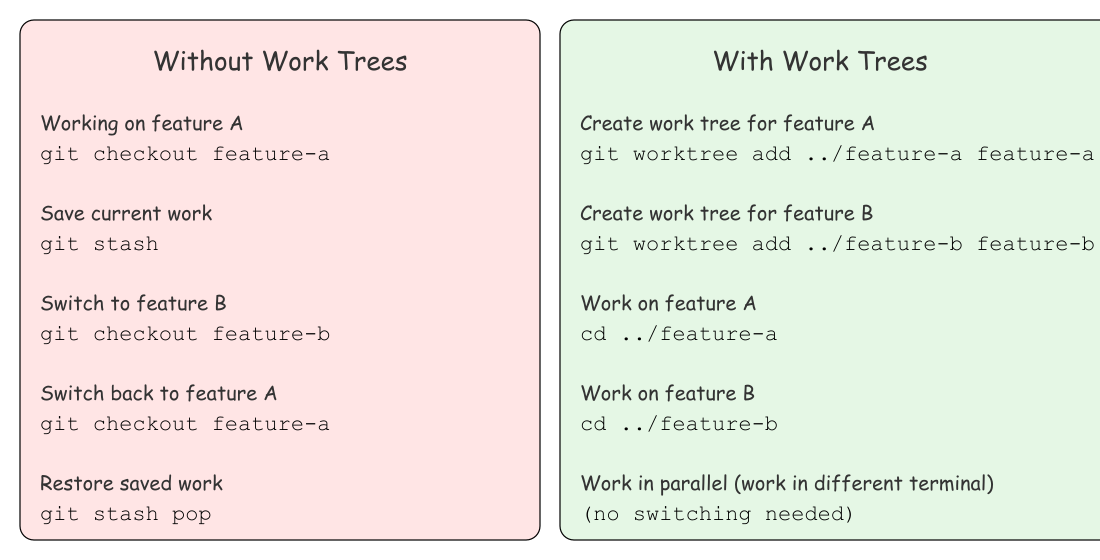
Worktrees vs stashing
Most devs context-switch by stashing, checking out another branch, doing the thing, then switching back and unstashing. It’s muscle memory. With a worktree, you leave your work as-is and just cd into the other folder — no stash, no checkout, no “I had uncommitted changes.” Reviewing a PR or doing a quick fix no longer has to derail your flow.
Resources
- What is the difference between a new working tree and a branch? (Stack Overflow)
- Hot take: worktrees are underrated (Reddit)