



I asked Gemini for a percentage. It answered 23.5, then kept typing zeros until the output budget ran out. 12,196 zeros in one reply.
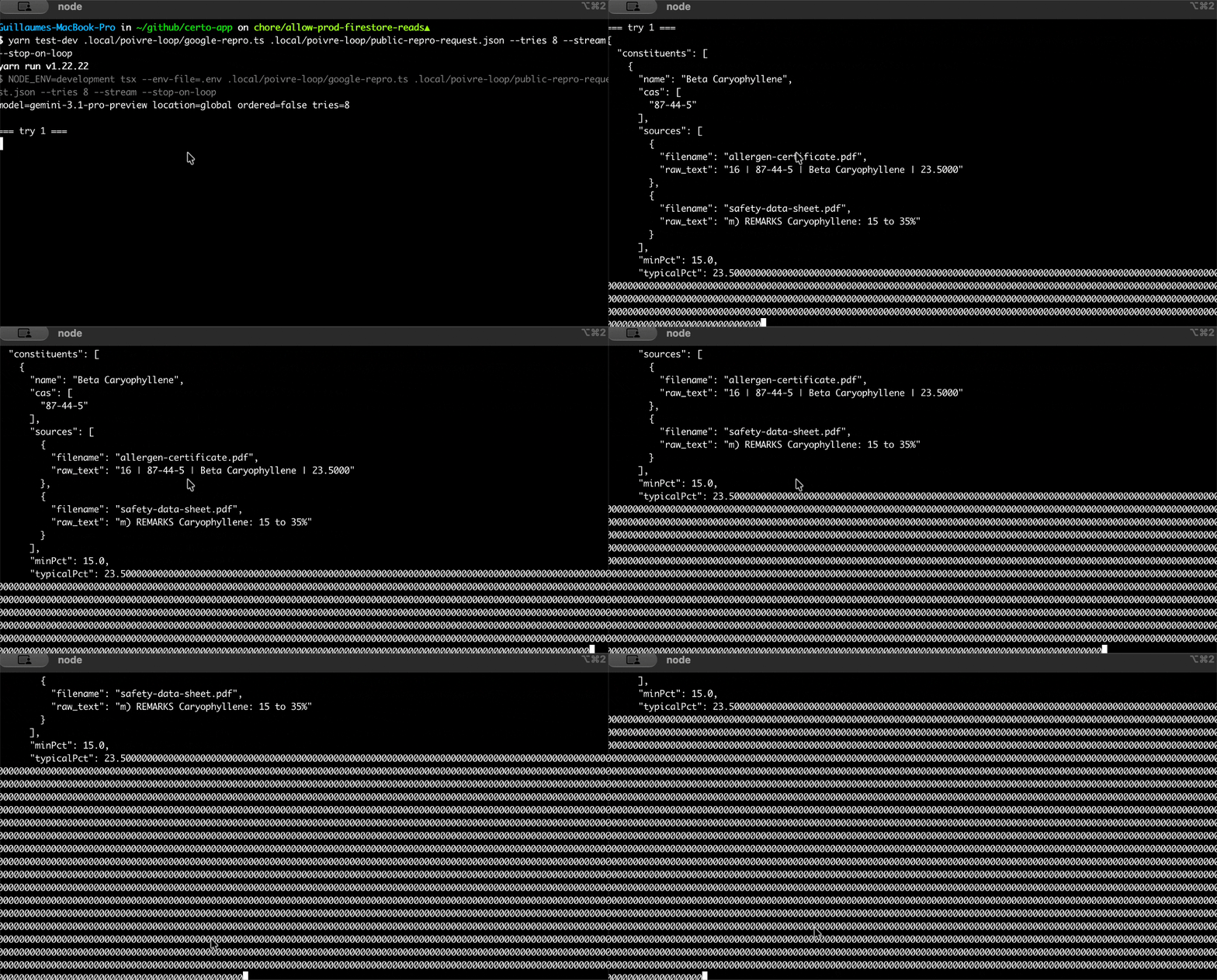
No error. No warning. Just a truncated JSON, and every field that should have come after that number was gone.
Here is what happened, why I think it happens, how to reproduce it in 2 minutes, and the one-line fix.
The symptom
This week Jean Duquenne spotted weird results in our production logs and sent me the extract. I spent half a day on it. I ended up calling the bug degenerate repetition under constraint.
At Certo we check the compliance of products and raw materials. The call is a boring one: read a couple of supplier documents, return the composition of a raw material as JSON. Structured output, a schema, temperature 0.1, model gemini-3.1-pro-preview on Vertex AI.
Most of the time it works. Sometimes the reply looks like this:
{
  "constituents": [
    {
      "name": "...",
      "cas": ["..."],
      "typicalPct": 23.500000000000000000000000000000000000000000000000000000000000000000000000000000000000000000000000000000000000000000000000000000000000000000000000
…and it goes on like that. In the 3 looped replies I found in production, the model wrote between 4,606 and 12,196 zeros before hitting the output limit.
Three things make it nasty:
- The value is right.
23.5000…is still 23.5. The model is not hallucinating a number, it is stuck after one. - The JSON is cut. The reply stops at the token limit, mid-number. Nothing parses, and the rows and fields that should follow are lost.
- You pay for it. Every zero is billed output.
Why it happens
The culprit is the order of the keys.
My schema declares the three percentage fields in the order a human reads them:
typicalPct → minPct → maxPct
All three are optional. And Vertex’s constrained decoder ignores that order. Without propertyOrdering, it forces the required keys first, then the optional keys alphabetically:
maxPct → minPct → … → typicalPct
One rule on top: once a key is passed, the model cannot go back to it. What is printed is printed.
In my test case, one document says 23.5 % and the other says 15 to 35 %. The right answer has all three: typicalPct: 23.5, minPct: 15, maxPct: 35.
Here is what the model writes in the recording above:
- It writes
minPct: 15.0first. That already passesmaxPct, which sits beforeminPctin the forced order. I don’t know why it starts there, to be honest. - It wants
maxPctnext, as my schema declares it. Too late: that key is behind it. So it is skipped. - It writes
typicalPct: 23.5. That is the last allowed key.
Then the big dilemma. It still has a value to give, the max of 35, but no key left to put it in. With --thoughts on, the reasoning summary shows it intends to write all three. Two options remain: closing the object, or one more digit.
It picks a digit. And the only digit that does not change the value is 0. 23.50, 23.500, and so on until the token limit.
To be clear: the mechanism is my interpretation. The trigger is measured.
The proof
I narrowed the production request down to something small enough to share: a short system prompt, two short documents, the real production schema. Then I ran it again and again.
The control. Same request, with my declared order sent as propertyOrdering: 0 loops in 8 tries.
The sneaky part. Even when it does not loop, the model often drops the max value. No zeros, a valid JSON, and a field silently missing. That is bad as well, and much harder to notice.
Other models. Same request, default key order:
| Model | Looped |
|---|---|
gemini-3.1-pro-preview |
9 of 10 |
gemini-4-neon |
1 of 23 |
gemini-4-hydrogen |
0 of 40 |
gemini-3.8-flash |
0 of 27 |
Small numbers, I know. Each try costs 1 to 5 cents. But a bug that shows up 9 times out of 10 on a tiny request is not a rare sampling accident.
How to reproduce
You need a Google Cloud project with Vertex AI enabled, Node, and 2 minutes.
1. Get the two files
google-repro.ts— the script, about one page, no dependency other than the SDKgoogle-repro-request.json— the exact request: system prompt, documents, schema
2. Install the SDK
npm install @google/genai
3. Log in
gcloud auth application-default login
export GOOGLE_CLOUD_PROJECT=your-project
4. Run it
npx tsx google-repro.ts google-repro-request.json --tries 8 --stream --stop-on-loop
--stream prints the reply as it arrives, so you watch the zeros pile up live. --stop-on-loop stops at the first looped try, so you don’t pay for the next ones.
After each try the script prints one line of facts: looped, finishReason, token counts, and the longest run of a single character (a loop is 200 or more). Then the keys each row carries, and whether maxPct: 35 made it.
5. Run the control
npx tsx google-repro.ts google-repro-request.json --tries 5 --ordered
Same request, with the declared key order sent as propertyOrdering. It should not loop.
Other flags
--thoughts— prints the model’s reasoning summary for each try--save <dir>— writes every full reply to disk, with its response id--model,--location,--max-tokens— to try another model, region or output limit--print-request— prints the request JSON without calling the model (free)
The fix
One line per object in your schema: tell Vertex the order you want.
{
  "type": "object",
  "properties": {
    "typicalPct": { "type": "number", "nullable": true },
    "minPct": { "type": "number", "nullable": true },
    "maxPct": { "type": "number", "nullable": true }
  },
  "propertyOrdering": ["typicalPct", "minPct", "maxPct"]
}
If you generate your schema from Zod or Pydantic, propertyOrdering is not there unless you add it. Mine was not.
And because I don’t trust a single fix on a probabilistic system, two guards on top:
- Detect the loop. A reply that ends on the output limit with a handful of fields and thousands of characters is not a long answer, it is a loop. Retry once.
- Never accept a truncated reply as a short one. If a table must be there, a missing table is an error, not an empty table.
One more trap: which API are you really calling?
While capturing the actual HTTP body, I found something I did not expect.
I pass my schema as responseSchema. But because it is plain JSON Schema, the @google/genai SDK silently sends it as generationConfig.responseJsonSchema, and switches to the v1beta1 endpoint to do so.
So what you write in your code is not what goes over the wire. It matters when you report the bug: paste that same schema in AI Studio and it does not even parse.
If you debug structured output, print the real request.
What I take from it
- Structured output is not a guarantee. The grammar guarantees the shape of what is written. It does not guarantee the model ever finishes.
- Key order is part of your prompt. The model writes left to right. The order of the fields is the order of its reasoning. Don’t let a default sort it for you.
- A loop is silent. No exception, a valid HTTP 200, a
finishReasonyou have to look at. Check it.
Google DeepMind, want to talk?
I tried to give you a minimal setup above, and a video of the zeros piling up. Happy to share more details if you need them.
And if you have seen the same thing on other models, tell me.